Team Entries
Wanting to submit an entry as a team? Make sure everyone gets the credit they deserve. This guide explains how to add collaborators to your contest entries and portfolio projects, and how the approval process works.
Wanting to submit an entry as a team? Make sure everyone gets the credit they deserve. This guide explains how to add collaborators to your contest entries and portfolio projects, and how the approval process works.
Eligible Categories
Teams can only enter the Film of the Year or Game of the Year.
How Team Entries Work
Team entries require a Team Leader to submit on behalf of the group. Here's the key concept:
- Nominate a Team Leader - Choose one person to be responsible for the submission
- Team Leader submits the entry - They create and submit the entry from their personal account
- Team Leader invites collaborators - They add all team members so everyone gets credited
Step-by-Step: Submitting a Team Entry
1. Team Leader Creates the Entry
The nominated Team Leader:
- Logs into their personal Rookies account
- Creates a new entry for Film of the Year or Game of the Year
- Adds all the media (videos, images, breakdowns)
- Writes the description explaining the project
2. Add Team Members
On the Entry Details step:
- Find the Team Members field
- Type each collaborator's Rookies username
- Select them from the dropdown
- Repeat for all team members
Important: Team members must have a Rookies account to be added. They cannot be added as plain text.
3. Team Members Approve the Request
When the Team Leader adds someone, that person needs to approve the collaboration:
- They receive an email notification about the request
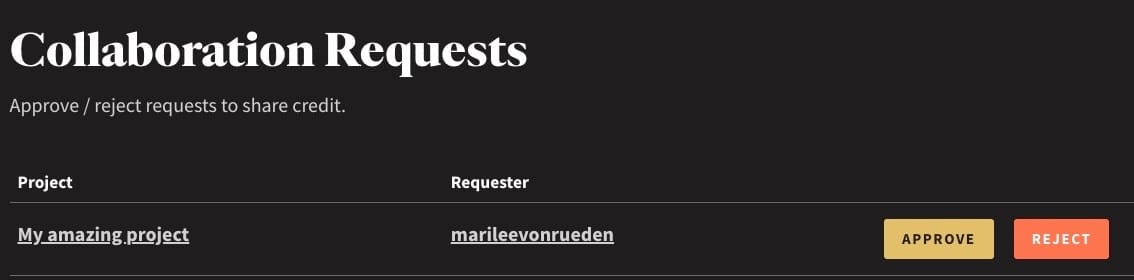
- A request appears on their Dashboard under "Collaboration Requests"
- They click Approve to be connected to the entry
Until they approve, they won't appear as a collaborator on the entry.

What Team Members Get
Once a team member approves the collaboration:
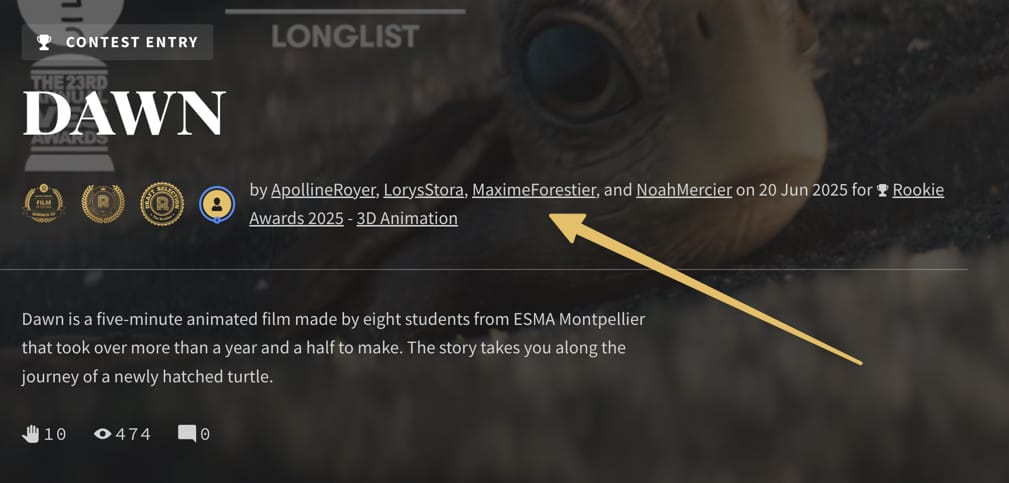
- Their name appears on the entry with a link to their profile
- The entry appears in their portfolio
- If the entry wins an award, they are credited as part of the winning team
What Team Members Cannot Do
Only the Team Leader (who created the entry) can:
- Edit the entry content
- Add or remove team members
- Submit the entry
- Delete the entry
Collaborators have read-only access.
Individual Entries by Team Members are Highly Encouraged
Every team member should also create their own individual entry to Rookie of the Year categories.
Why? Team entries only show the collective work. Individual entries let you:
- Highlight your specific contributions and role
- Show your personal skills and strengths
- Include other work from your portfolio
- Stand out to judges as an individual talent
A team entry to Film of the Year or Game of the Year is great, but an individual Rookie of the Year entry showcases YOU.
Approving Collaboration Requests
If you've been added as a team member:
- Log in to The Rookies
- Check your Dashboard - Look for "Collaboration Requests" at the top
- Review the request - See the entry name and who invited you
- Click Approve or Reject
Troubleshooting
Team member not appearing in search?
- They need a Rookies account first
- Check you're typing their username correctly (not their display name)
Team member didn't receive the notification?
- Ask them to check their spam folder
- Tell them to log in and check their Dashboard